The manager brief and status report
See what needs a manager's look across every project on Today and in the Monday email, and print a one-page project status report for leadership.
Your words may differ. Each workspace can choose its own words: a class might be a cohort, program or group, a learner a participant, trainee or new hire, a session a module or lesson. These guides use the default words. The steps are the same whatever your workspace calls them. Change your workspace's words
If your role includes Manage projects, Skovrum gathers what needs your attention across the team's projects, so you don't have to go looking.
This week across projects
On Today, the This week across projects card lists:
| Group | What's in it |
|---|---|
| Off track or at risk | Open projects whose last status update said so, with their owner |
| Due later than first planned | Open projects whose due date has moved past the first one they were given, by how much |
| Milestones in the next two weeks | Open milestone tasks coming up |
| Over capacity next week | People booked for more hours than they work next week, from Team workload |
| No status update in 14 days | Active or blocked projects nobody has posted an update on for two weeks |
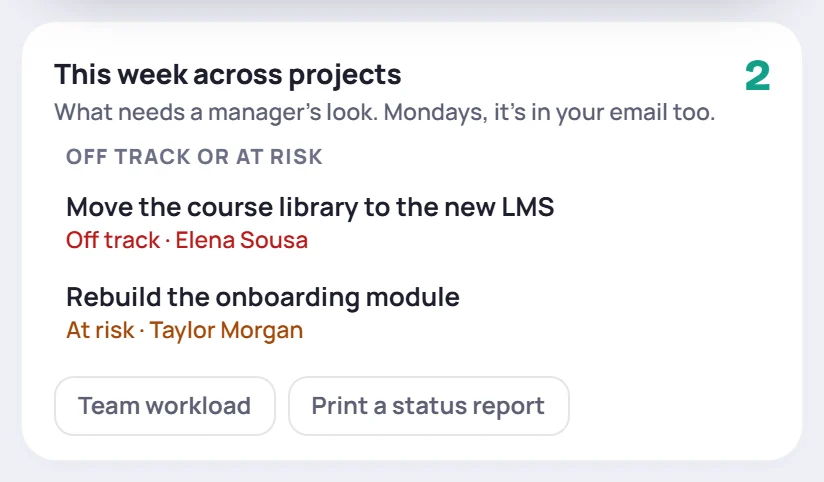
Click a project to open it, or a person to open their week. Team workload opens the Workload view. When nothing needs a look, the card says so.
On Mondays the same list comes in your daily email, as This week across projects.
The owners of quiet projects hear about it too: their bell shows Time for an update, and their Monday email lists the project. A line or two of status update clears it.
Print a status report
A status report is a one-page summary of the projects for leadership. Print one from:
- Print a status report on the This week across projects card, or in the ⋯ menu on the Projects screen. These cover the last 30 days.
- Print a status report in Analytics → Workload. It covers the date range you picked.
It holds:
- Where things stand: how many projects are open, on track, at risk, off track and without an update.
- Needs attention: the projects off track or at risk, with their last update.
- Wins: the projects finished in the period, and how many of those with a due date were done on time.
- Coming up: milestones and project due dates in the next 30 days.
- Slips: open projects due later than first planned.
- Team utilization: hours in sessions and on projects against everyone's hours, and how much of their own time each person used, from Team workload.
It opens in a new window, ready to print or save as a PDF. If nothing happens, allow pop-ups for Skovrum.
Common questions
Who sees the card and the Monday list? People whose role includes Manage projects. That's Admins by default, and roles that coach trainers. Everyone else sees their own projects and their own week.
Can someone without Manage projects print a status report? Yes, if they can open Projects: use its ⋯ menu. Analytics → Workload needs View analytics. It shows every project, since projects are visible to the whole team.