How certifications work
Pass marks, attempts and retakes, expiry, and where certifications come from: the workspace catalog and each class's own list.
Your words may differ. Each workspace can choose its own words: a class might be a cohort, program or group, a learner a participant, trainee or new hire, a session a module or lesson. These guides use the default words. The steps are the same whatever your workspace calls them. Change your workspace's words
A certification is something a learner can pass, such as an end-of-training assessment. Your workspace keeps one list of them, the catalog. Each class chooses the certifications it awards, and trainers record each learner's scores against them. This page explains the rules behind all of that. Reading it takes about seven minutes.
The pieces
| Piece | What it is | Where it lives |
|---|---|---|
| The catalog | Every certification your workspace awards, each with a pass mark and an optional renewal period | Manage → Data → Certifications |
| A class's certifications | The certifications this class awards, picked from the catalog by name | The class's settings |
| An attempt | One score, from 0 to 100%, on one date | The learner's row in that class |
| A pass | Any attempt at or above the pass mark | Worked out by Skovrum |
| An expiry date | The date of the first pass, plus the renewal period | Worked out by Skovrum |
Because every class links to the same catalog entry, a learner's certification counts the same way everywhere. A pass in last year's class shows up next to this year's, renewals follow the latest pass, and learning paths count a pass from any class.
The catalog
Go to Manage, open the Data tab and find the Certifications card. Each row shows the certification's pass mark, how often it renews and how many classes use it.
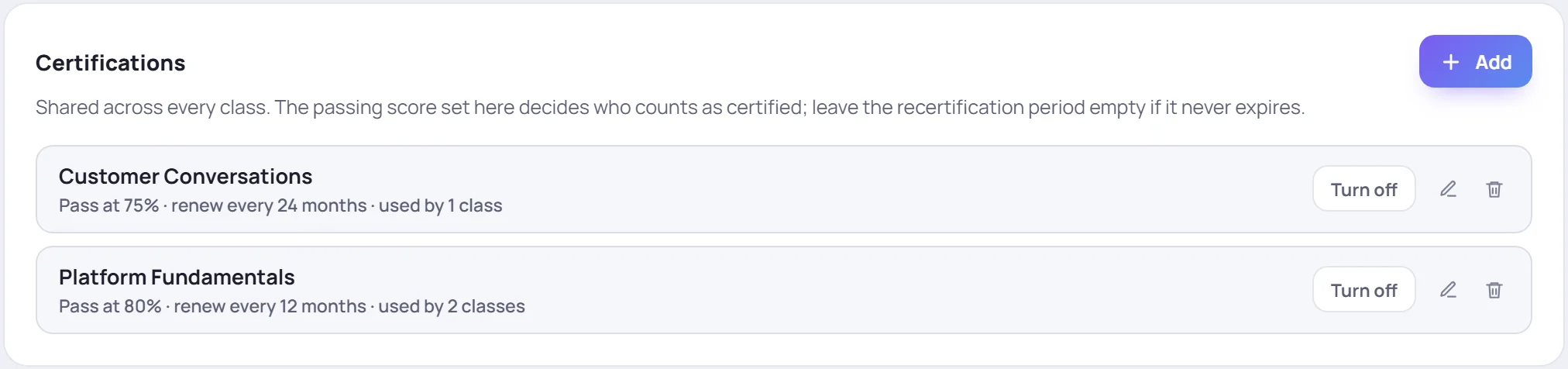
Add a certification
- Click Add on the Certifications card.
- Give it a Name, and optionally a Description of what it covers.
- Set the Passing score, from 0 to 100.
- Set Recertify after to the number of months a pass lasts (1 to 600). Leave it empty if a pass never expires.
- Click Save.
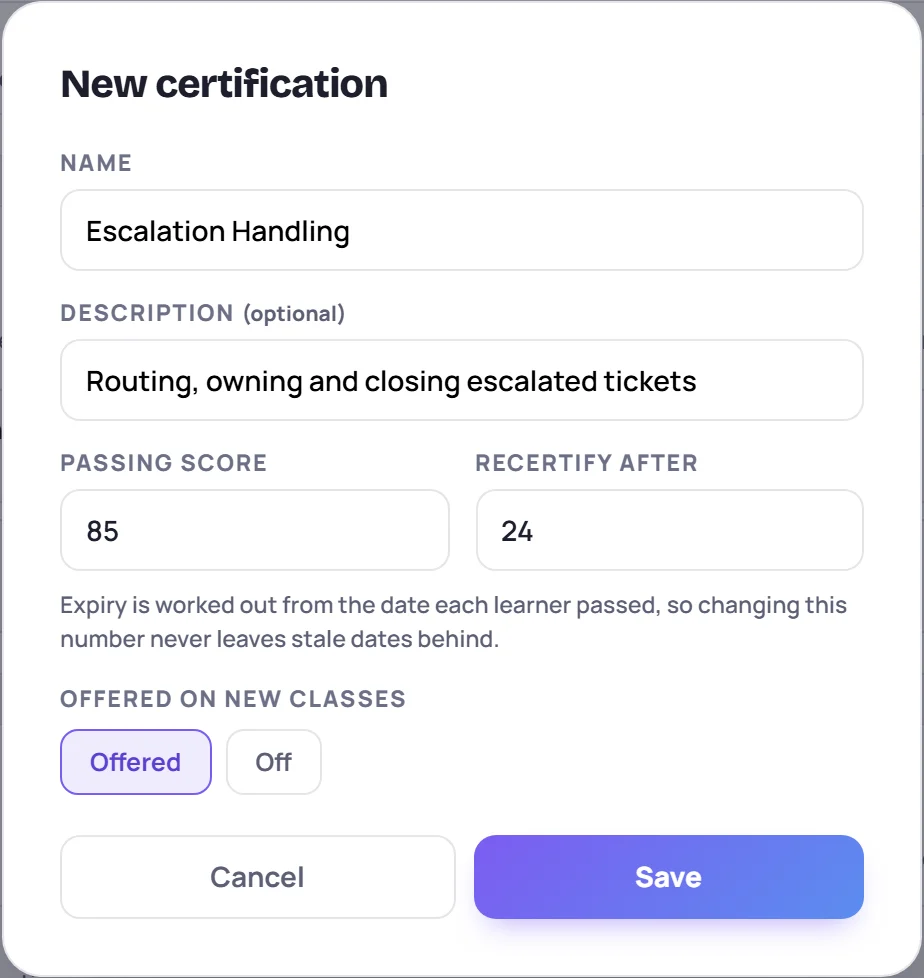
Names must be unique. Skovrum ignores capital letters and extra spaces when it compares them, so First aid and First Aid count as the same certification.
Change a pass mark
Click the pencil next to a certification to edit it. If you change the Passing score of a certification that classes already use, Skovrum asks you to confirm with Change score first. Every attempt already recorded is then checked again against the new pass mark. That can change who counts as passed, in both directions.
Changing Recertify after is safe at any time. Expiry dates aren't stored; they're worked out from each learner's pass date whenever they're shown, so every date updates at once.
Turn off or remove a certification
- Turn off when you stop offering a certification. Classes that already use it keep it, along with every score. Click Turn on to bring it back.
- The trash icon removes a certification from the catalog. You can only remove one that isn't used by any class, isn't in a course's defaults and isn't a step in a learning path. Otherwise Skovrum tells you what's still using it, and turning it off is the way to go.
Defaults for new certifications
The pass mark and renewal period that a new certification starts with come from Manage → Workspace, on its Certifications card. Changing them never alters the certifications you already have. See Workspace settings.

How a class gets its certifications
A class lists its certifications one per line, in the Certifications field of the new-class form or of Edit on the class. Skovrum links each line to the catalog entry with the same name, so the class picks up that certification's pass mark and renewal period without anyone choosing from a list.
Some classes start with their list already filled in:
- A class started from a course gets the course's certifications.
- A new onboarding class starts with the certifications your most recent onboarding class used.
Removing a line from a class's certifications deletes that certification from the class, together with every score recorded for it there. Renaming a line counts as removing it and adding a new one.
Attempts and retakes
Every score you record is an attempt with its own date. A learner can have as many as they need, so a retake is simply another attempt. See Record scores.
- Passed means at least one attempt reached the pass mark. A later, lower attempt doesn't undo it.
- Attempted means there's at least one score but none has reached the pass mark yet.
- Not started means no score yet.
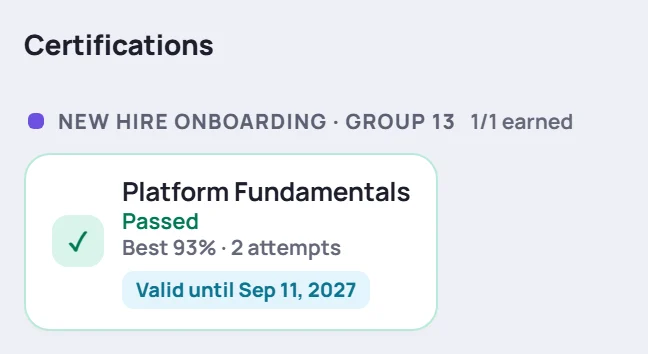
Each attempt is marked Pass or Retry against the pass mark. Skovrum also keeps the best score and the number of attempts, which feed the first-time pass rate in Analytics.
The Compare & certify tab of a class shows everyone at once: one column per certification, with each learner's status, best score and number of attempts.
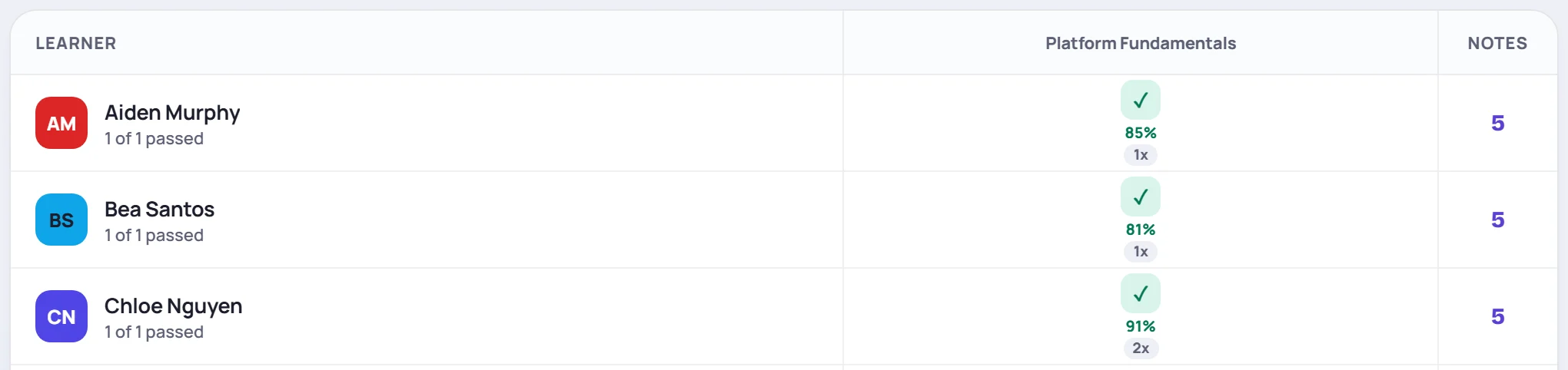
Click any cell to see that learner's attempts. The window shows the pass mark and renewal period, every attempt with its date and result, and the expiry date.
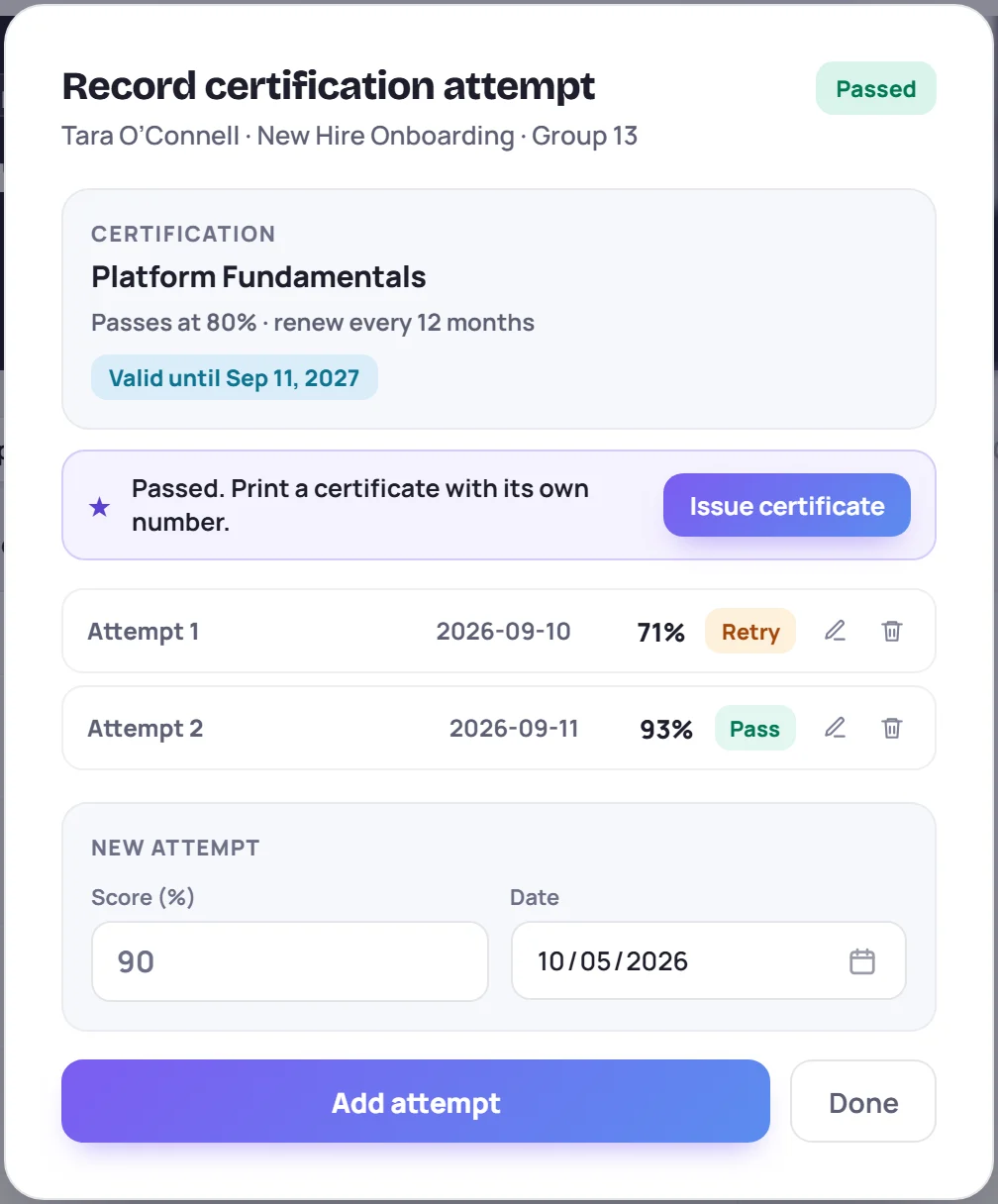
Expiry
If a certification has a renewal period, a pass lasts that many months from the date of the first passing attempt. Skovrum labels it:
| Label | Means |
|---|---|
| Valid until date | More than 60 days left |
| Expires date | 60 days or fewer left |
| Expired date | The date has passed |
A retake recorded in the same class doesn't restart the clock. To renew, the learner passes the same certification again in a later class, such as a refresher. Skovrum then follows the latest pass. See Track renewals.
An expired certification still reads Passed, because the learner did pass it. The expiry label sits beside it.
Where certifications show up
- The class. The Compare & certify tab, the small colored squares on each learner's card on the Roster tab, and certs earned in the class header.
- The learner's profile. On the Timeline tab, the Certifications section lists every certification from every class they've been in, grouped by class.
- Renewals. Learners → Renewals, a card on Today and the bell. See Track renewals.
- Certificates. A learner who passes a catalog certification can be issued a numbered certificate. See Certificates.
- Reports. The class report, handoff packets and Analytics all include certification results.
Common questions
Why does a learner show Passed with a score below 90%? Each certification has its own pass mark, set in the catalog. Platform Fundamentals, for example, might pass at 80%. The window you open from a cell says Passes at …% for that certification.
We changed a pass mark and some learners are no longer passed. Changing a pass mark checks every recorded attempt again. Set it back, or record a new attempt for those learners.
Can a certification be on more than one class? Yes. That's the usual case: every onboarding class can award Platform Fundamentals. Results from all of them count towards the same renewals and learning paths.
Why can't I record a score? You can record scores only in classes you lead or co-lead, unless you're an Admin. Supervisors and other read-only roles can see scores but not change them.