Why didn't a learner get the survey?
The reasons a learner isn't sent a session's survey email, and how to check which one applies.
Your words may differ. Each workspace can choose its own words: a class might be a cohort, program or group, a learner a participant, trainee or new hire, a session a module or lesson. These guides use the default words. The steps are the same whatever your workspace calls them. Change your workspace's words
Start with the session's survey panel: open the session, click Session tools and choose Survey links. The Email to learners box says what happened to the session's email, and the line under it counts who was left out.
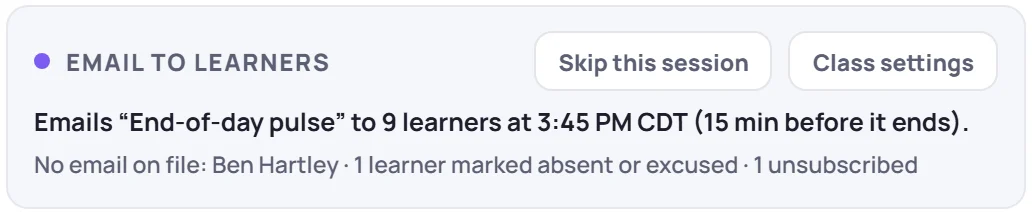
Reasons one learner was left out
| Reason | What to do |
|---|---|
| No email address on file, or one that isn't a valid address. The box names them. | Add their email on their profile, then use Email N learners on the session's link. |
| Marked absent or excused for that session. | If that was a mistake, fix their attendance, then email the link. |
| Unsubscribed from survey emails. | Share the link another way, for example the QR code in class. There's no setting in the app to resubscribe them. |
| Archived, or marked as termed. | Nothing: inactive learners aren't emailed. |
| Not in the class on the session's date: added afterwards, or had already left. | Share the link with them directly if they should answer. |
| Already emailed this link. A learner gets each link once, and two learners who share an address get one email between them. | Ask them to check their inbox for Quick feedback: and the session's name. |
If an email couldn't be delivered, the link's line in the panel shows how many couldn't be sent. Skovrum tries a failed send up to three times in all: again within the hour after the send time, or when you click Email N learners.
Reasons nobody got it
| The box says, or you notice | Why |
|---|---|
| Learners aren't emailed automatically in this class. | Survey emails are off for the class. See Email surveys automatically. |
| Skipped for this session. | Someone clicked Skip this session. |
| This session is cancelled … | Cancelled sessions send nothing. |
| Add an end time to this session … | The send time is counted from the end time. |
| … was revoked … | The session's link for that survey was revoked. Create it again in the panel. |
| … is archived or doesn't fit this class type. | Choose another survey in Class settings. |
| A survey was already emailed for this session … | A different survey was emailed by hand, so the automatic one stays back. |
| The automatic send time has passed. | It wasn't sent within an hour of the send time, for example because emails were switched on late. Use Email N learners. |
| The class is archived. | Archived classes don't send automatic survey emails. |
Still missing?
If the link's line says it was emailed and nothing failed, the emails left Skovrum. Ask the learner to check their spam or quarantine folder, or simply share the link or QR code with them.