Your workspace may use different words
Why your screens might say program, participant or facilitator instead of class, learner or trainer, and how an Admin changes the words.
Your words may differ. Each workspace can choose its own words: a class might be a cohort, program or group, a learner a participant, trainee or new hire, a session a module or lesson. These guides use the default words. The steps are the same whatever your workspace calls them. Change your workspace's words
Teams call things by different names. Yours might run programs rather than classes, train participants or new hires rather than learners, or have facilitators rather than trainers. Skovrum lets each workspace choose its own words and then uses them on every screen.
These help articles always use the default words: class, learner, trainer and session. If your workspace uses others, read them as your own. The buttons, screens and steps are exactly the same.
The choices
| Default word | Your workspace can call it |
|---|---|
| Class | A class, program, group or batch, or one more choice |
| Learner | A learner, participant, trainee, agent, employee, student or new hire |
| Trainer | A trainer, facilitator, coach or instructor |
| Session | A session, module or lesson |
Skovrum takes care of plurals and of "a" or "an", so a workspace that says agents gets "Add an agent", not "Add a agent".
Only Skovrum's own words change. Names you've typed stay as they are: a class called New Hire Onboarding · Group 14 keeps its name whatever classes are called.
Change your workspace's words
- Click More in the sidebar, then Manage.
- Open the Workspace tab.
- In Your words, pick a word from each list. For example shows how it will read.
- Click Save settings at the bottom of the settings.
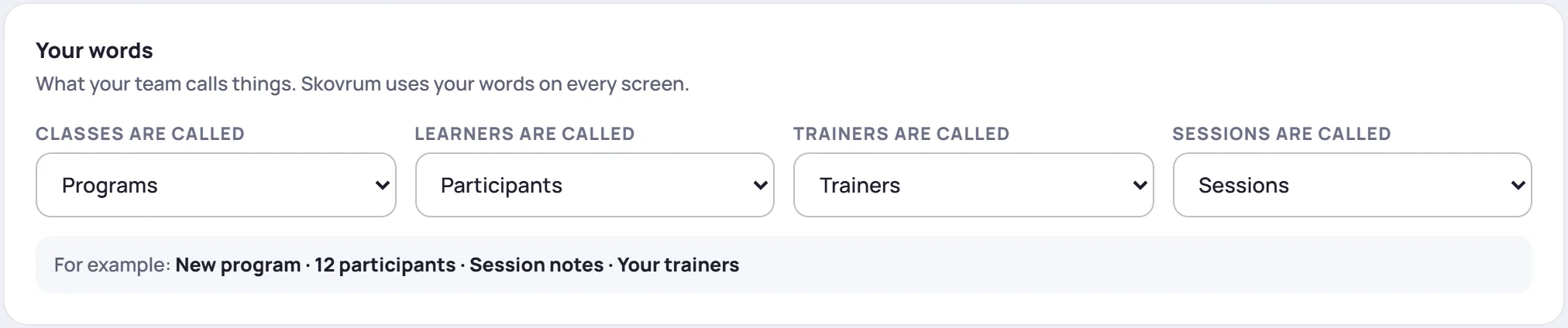
The new words reach everyone else within about a minute, or as soon as they reload Skovrum. You can change them back at any time, and nothing you've recorded is affected.
If your workspace groups classes by client or business unit, the word for those (client, site, department and so on) is set in the Clients and business units card on the same tab. See Clients and business units.
Where the default words still appear
For now, emails Skovrum sends (such as the daily email) and printed reports, such as the class report, still use the default words.