Learner to-dos and tasks
When to use a learner to-do and when to use a task, and where each one shows up.
Your words may differ. Each workspace can choose its own words: a class might be a cohort, program or group, a learner a participant, trainee or new hire, a session a module or lesson. These guides use the default words. The steps are the same whatever your workspace calls them. Change your workspace's words
Skovrum has two kinds of follow-up. A learner to-do is a small follow-up about one learner, such as Send Carmen the refund-rules cheat sheet. A task is a follow-up for the team, such as Book the practice-queue seats for next week. Use a to-do when it's about one person, and a task for everything else.
Side by side
| Learner to-do | Task | |
|---|---|---|
| About | One learner, in one class | The team's work, for a class or General |
| Add it from | The learner's profile (To-dos on the Overview tab), or their initials on the session roster | The Tasks screen, the Tasks card on Today, N, or Action in your notes |
| Shows a due date, priority and assignee | No | Yes |
| Listed on | The learner's profile, the session roster, and Learner to-dos on the Tasks screen | The Tasks screen and the Tasks card on Today |
| Reminders | Counted under Learner tasks when you wrap up a session | The bell, the daily email and the calendar |
| In a handoff packet | Yes, under Open follow-ups | No |
Learner to-dos on the Tasks screen
Below the team's tasks, Learner to-dos gathers every open to-do, one group per learner, with how many each has open.
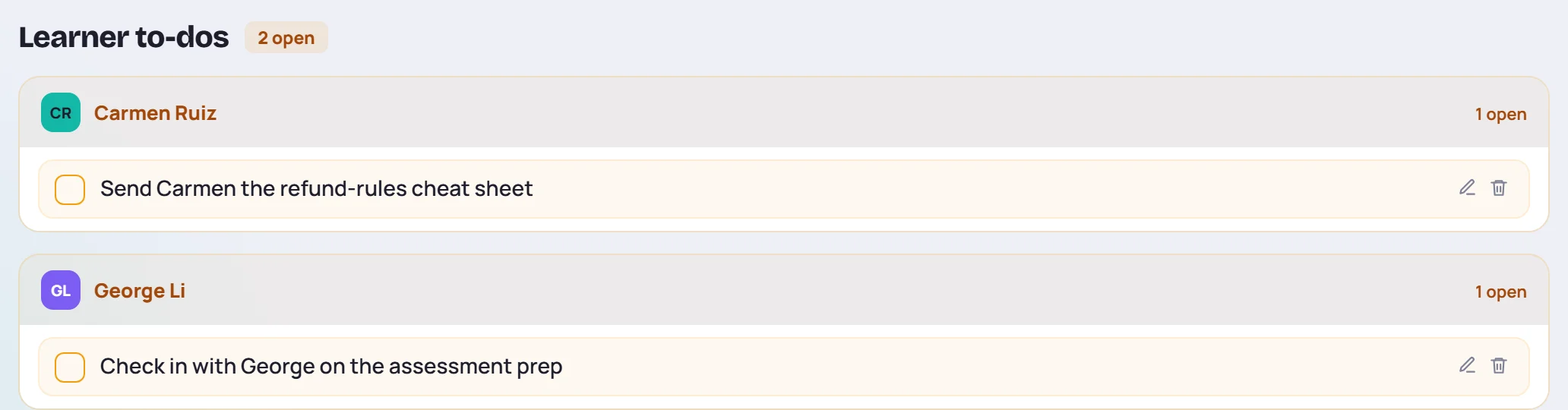
Tick the box when it's done. Done to-dos move to N completed learner to-dos at the bottom, where you can untick them. The pencil and trash icons edit or delete a to-do; they're there for the person who added it and for Admins.
To add a to-do, use the learner's profile or the session roster. See Engagement, to-dos and history and The learner profile.
Catch-ups are to-dos
When a learner misses a session, Plan catch-up adds a to-do for the topics they missed, linked to the class's next session. See Missed topics and catch-ups.
Common questions
Why isn't my to-do on Today? The Tasks card on Today and the bell show tasks only. Learner to-dos stay with the learner.
Can I turn a to-do into a task? No. Add a task with the same text, then delete the to-do.