Competencies
Set up the skills trainers rate in observations, for every class, one class type or one course, and retire one without losing past observations.
Your words may differ. Each workspace can choose its own words: a class might be a cohort, program or group, a learner a participant, trainee or new hire, a session a module or lesson. These guides use the default words. The steps are the same whatever your workspace calls them. Change your workspace's words
A competency is a skill you want to track, such as Communication or Product knowledge. When trainers log an observation, they can link it to a competency and rate it from 1 to 5. Those ratings build each learner's competency trends and the class report's Observations by Competency.
Your workspace starts with five: Communication, Technical, Collaboration, Leadership and Problem-solving (see What's in a new workspace). Rename, retire or add to them to match what you actually assess.
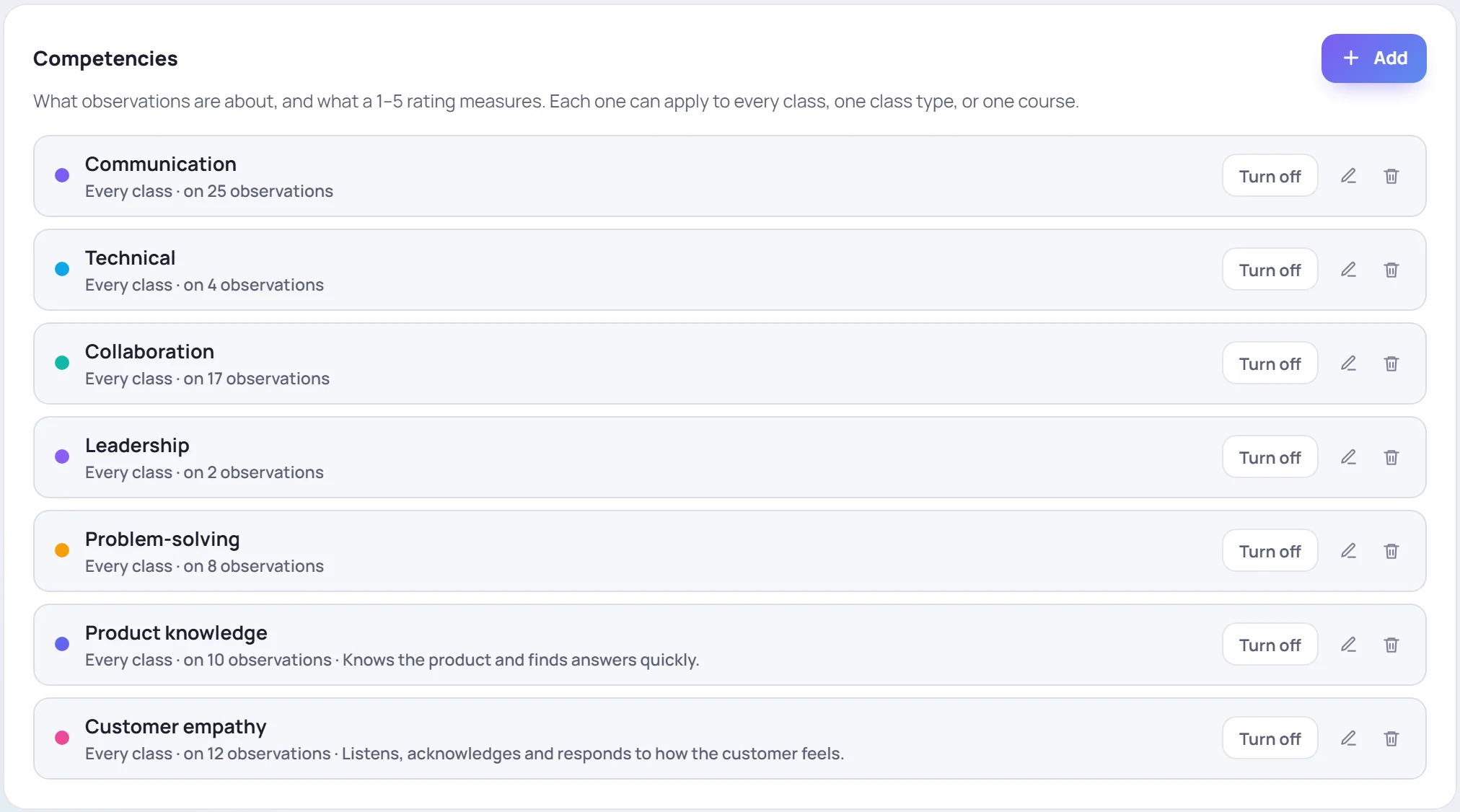
Each line says where the competency applies and how many observations use it.
Add a competency
- Click Add on the Competencies card.
- Give it a Name. Pick a Color: it's used for this competency in trends and reports.
- Optionally add a Description of what good looks like. It shows in the list.
- Choose what it Applies to (below).
- Set the Order. Lower numbers come first in the trainers' list.
- Leave In composers on Offered, and click Save.
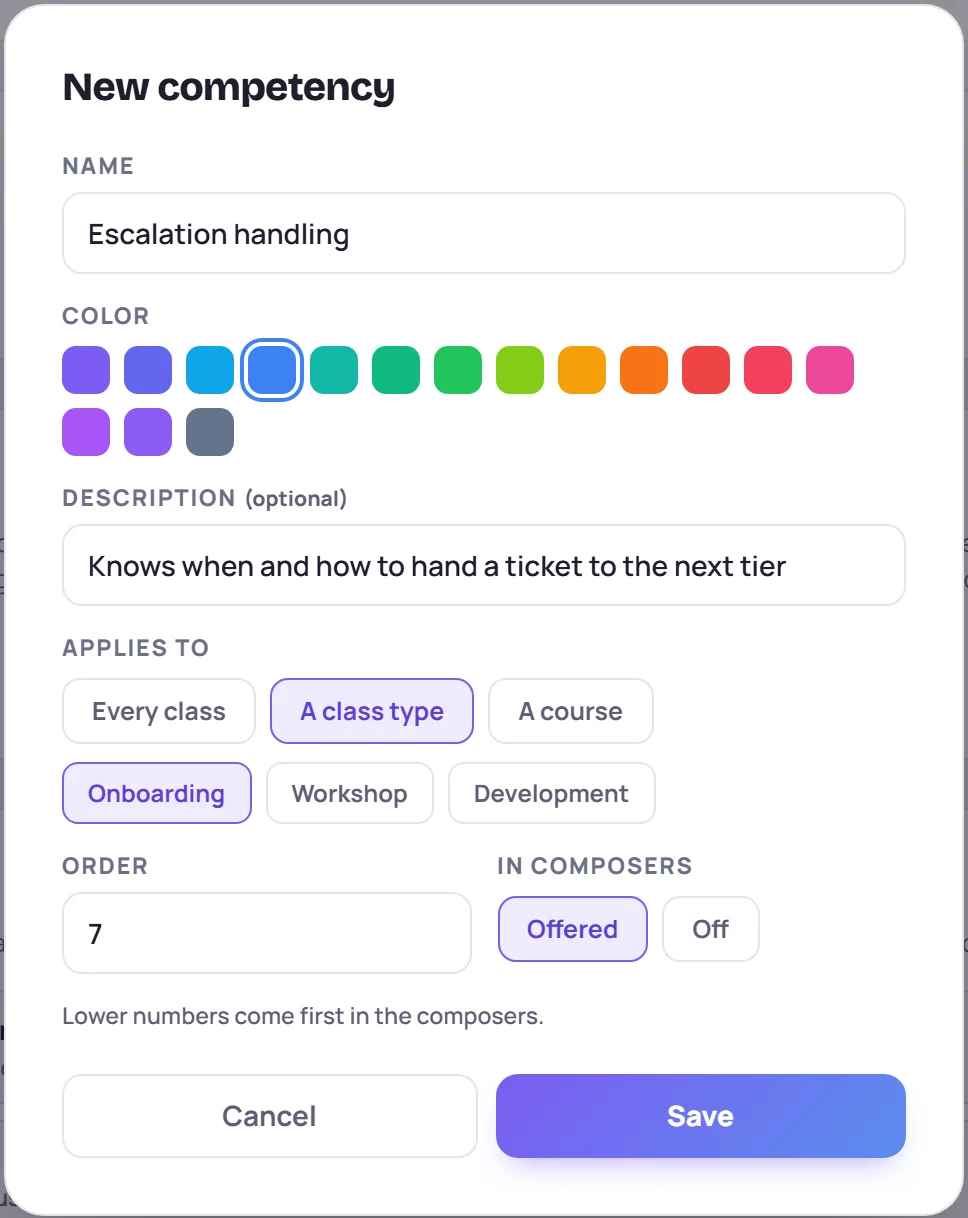
Every class, one class type, or one course
Applies to decides which classes offer the competency:
| Choose | Offered in |
|---|---|
| Every class | All classes |
| A class type | Classes of one type: Onboarding, Workshop or Development |
| A course | Classes delivered from one course |
When a trainer logs an observation, the list shows the competencies for every class, plus those for that class's type and its course. So a workshop on escalations can rate Escalation handling without it cluttering every other class.
Two competencies can share a name only if no class could see both, for example one for onboarding classes and one for workshops. Otherwise Skovrum says the name already applies to some of the same classes. Observation, Engagement and General are taken: Skovrum uses them for observations without a competency.
Rename or change one
Click the pencil, change it and click Save. Renaming changes the label on every observation that already uses it, so past ratings stay together under the new name.
Retire one: turn it off
Click Turn off. The competency disappears from the trainers' list, but every observation that used it keeps it, and so do the trends and reports. It's dimmed and marked OFF.

Click Turn on to offer it again.
Remove one
The bin removes a competency only if no observation uses it yet. One that's been used says how many observations it's on and asks you to turn it off instead. That keeps past ratings from losing their competency.
Common questions
A trainer can't find a competency in the list. Check that it's on (not marked OFF) and that it applies to their class: every class, the class's type, or the class's course.
Does a rating mean the same thing everywhere? Yes. Every competency uses the same 1 to 5 scale, from Needs Improvement to Exemplary. See Observations and competencies.
Are changes recorded? On the Team and Business plans, editing or removing a competency is recorded in the audit log.