Issue and print certificates
Issue and print a numbered certificate when a learner passes a certification, finishes a course or completes a learning path, and revoke one if you need to.
Your words may differ. Each workspace can choose its own words: a class might be a cohort, program or group, a learner a participant, trainee or new hire, a session a module or lesson. These guides use the default words. The steps are the same whatever your workspace calls them. Change your workspace's words
A certificate is a printable page that says a learner earned something. Each one has its own number, such as SKV-2026-7WPUC6, so it can be checked later. Skovrum keeps a record of every certificate it issues: printing one again gives exactly the same page and number.
What a learner can get a certificate for
| Kind | Earned when | The certificate says |
|---|---|---|
| Certification | They pass a certification from your workspace's catalog, in any class | Certificate of Achievement … has earned the certification |
| Course | A class linked to a course has ended, and they were still in it at the end | Certificate of Completion … has successfully completed |
| Learning path | They finish every required step of a learning path | Certificate of Completion … has completed the learning path |
Skovrum checks this every time a certificate is issued. A certification that isn't linked to the catalog can't have a certificate.
Issue a certificate
The usual place is the learner's profile. Open the learner, click the Timeline tab and find the Certificates section. Everything they've earned but haven't been issued yet is listed with ready to issue. Click Issue certificate.
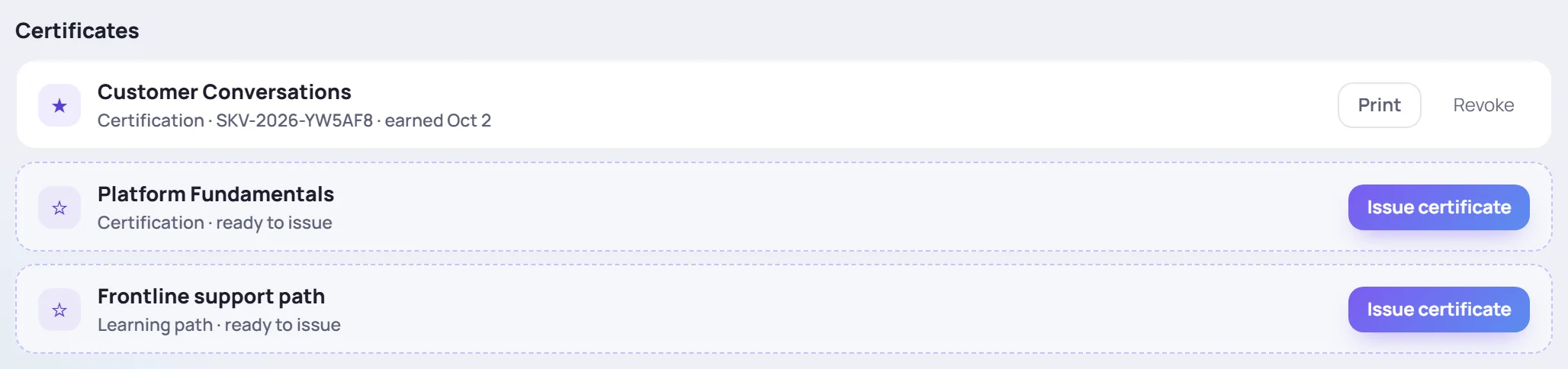
There are other places to issue from, wherever the moment comes up:
- After recording a pass. In Record certification attempt, a passed certification from the catalog shows Passed. Print a certificate with its own number. and an Issue certificate button. See Record scores.
- A finished learning path. On the profile's Learning paths section, a finished path has Issue certificate, or Print certificate once it's been issued. The trainers of the learner's most recent class on that path also get a Path complete item in the bell, saying Issue their certificate.
- A course that has ended. On a class linked to a course, once its last day has passed, each learner who stayed to the end gets a ★ Certificate button on their card on the Roster tab. ★ Certificates at the top of the class issues them for everyone at once, one page each.
Issuing opens the certificate in a new window, ready to print. If nothing opens, your browser blocked the pop-up: allow pop-ups for Skovrum and click again.
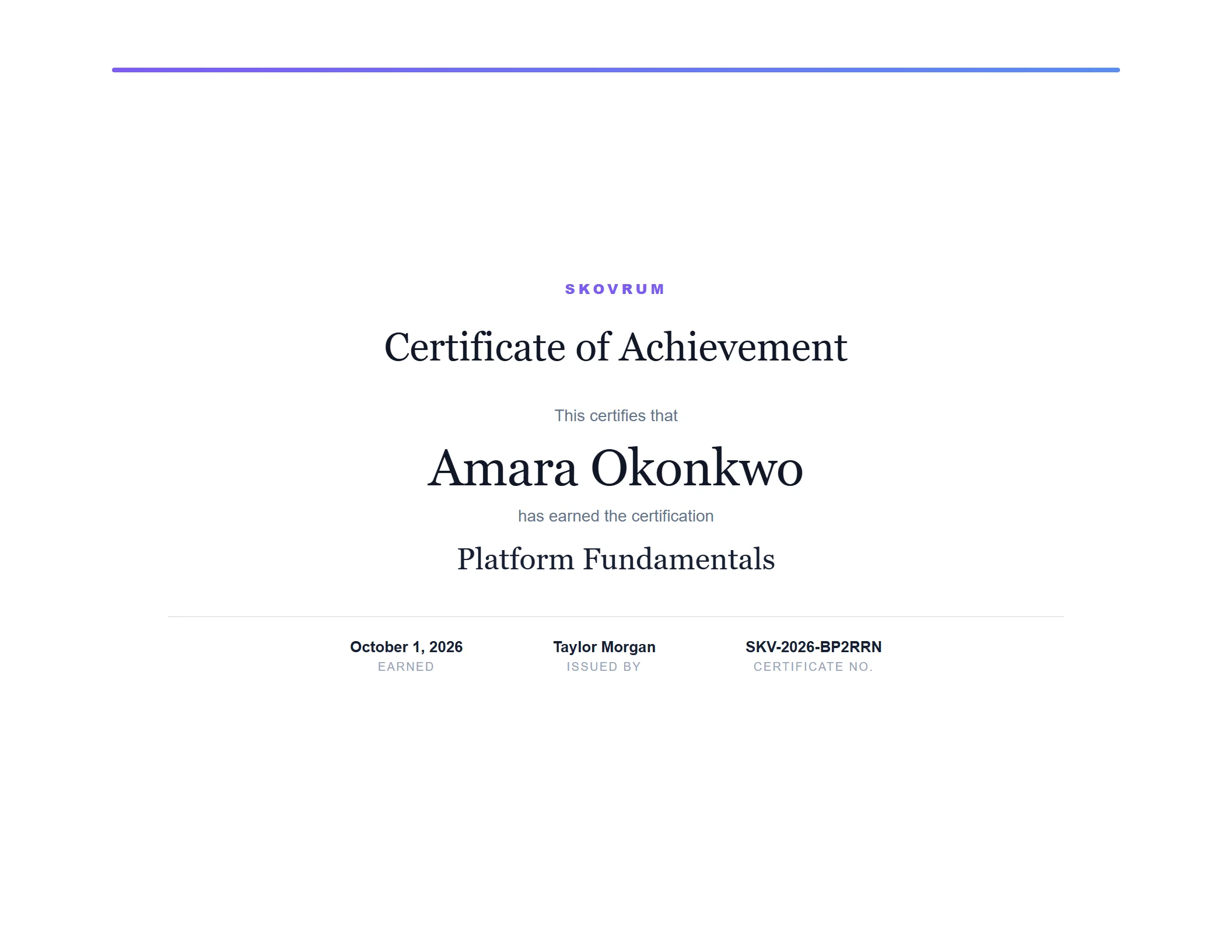
Each certificate is one landscape page. It shows:
- the learner's full name, and their preferred name below it if they have one;
- what they earned;
- the date they Earned it: the passing attempt, the class's last day or the day the path was finished;
- who it was Issued by, and the Certificate no.
To print it again later, click Print next to it in the learner's Certificates section. When a learner has more than one, Print all puts them in one document.
Issuing a certificate that already exists doesn't create a second one. You get the same certificate, and the message says (already issued).
Revoke a certificate
If a certificate was issued by mistake, or shouldn't stand any more, an Admin can revoke it. Click Revoke next to it, then Revoke again to confirm.

A revoked certificate stays on the learner's list, marked Revoked with the date, but it can't be printed. Revoking doesn't change the learner's scores or progress.
A revoked certificate stays revoked. It isn't reissued by accident, not even by ★ Certificates for a whole class. If the learner should have it after all, an Admin will find it in the Certificates section marked previously revoked. Issuing it from there gives it a new number.
Common questions
Why don't I see Issue certificate? Either your role can't issue certificates, or the certification isn't linked to your workspace's catalog. Trainers can only issue certificates for learners in classes they lead, so issuing for anyone else fails. Certificates already issued can still be printed.
Why is there no ★ Certificates button on my class? It appears only on a class that's linked to a course and whose last day has passed.
Do learners get the certificate by email? No. Skovrum prints certificates; hand them out or save them as PDF from the print window.
Does a certificate expire when the certification does? No. The certificate records that the learner earned it on that date. Renewals are tracked separately. See Track renewals.