Archive, delete or erase
Take a learner off every roster while keeping their history, delete a learner added by mistake, or erase everything about someone who has asked for their data to be deleted.
Your words may differ. Each workspace can choose its own words: a class might be a cohort, program or group, a learner a participant, trainee or new hire, a session a module or lesson. These guides use the default words. The steps are the same whatever your workspace calls them. Change your workspace's words
There are three ways to remove a learner, and they do very different things. Most of the time you want archive.
| Archive | Delete | Erase | |
|---|---|---|---|
| Use it when | Someone has left or finished | A learner was added by mistake | Someone asks for their personal data to be deleted |
| Their history | Kept | There isn't any | Removed for good |
| Can you undo it? | Yes, by enrolling them again | No | No |
| Who | Admins, and Trainers for learners in their own classes | Admins | Admins |
Archive a learner
Archiving takes the learner off every active class roster from today. Their profile, observations, attendance, certifications and past classes all stay.
- Admins: go to Manage → Learners, click the trash icon on their row (Archive learner) and confirm with Archive.
- Anyone who can archive: in Learners, click Select, tick the learners, then click Archive in the bar at the bottom and confirm.

Archived learners are hidden from Learners by default. Set Status to Archived or All in Filters to see them. To bring someone back, enroll them in a class again, for example with Add learner → Existing (see Add learners).
Delete a learner added by mistake
You can delete a learner outright only while nothing has been recorded about them: no observations, attendance marks, certification results, tasks, questions, survey answers, catch-ups, certificates, files or learning paths. Being on a class roster doesn't count.
In Manage → Learners, click the trash icon on their row. For a learner with nothing recorded, the confirmation offers both choices: Archive, or Delete permanently.

An archived learner with nothing recorded has a Delete learner trash icon instead, which asks you to confirm with Delete permanently.
If anything has been recorded about them by the time you confirm, Skovrum refuses and asks you to archive them instead.
Erase a learner's data
Use erase for a request to delete someone's personal data. It removes everything recorded about them, for everyone, and can't be undone.
- Open the learner's profile and click Erase… at the top right.
- Check it's the right person. The red box shows their email, employee ID, classes and when they were added, because two learners can share a name.
- Read What will go. It counts each kind of record that will be removed.
- Type their full name exactly as shown in Type their full name to confirm.
- Click Erase permanently.
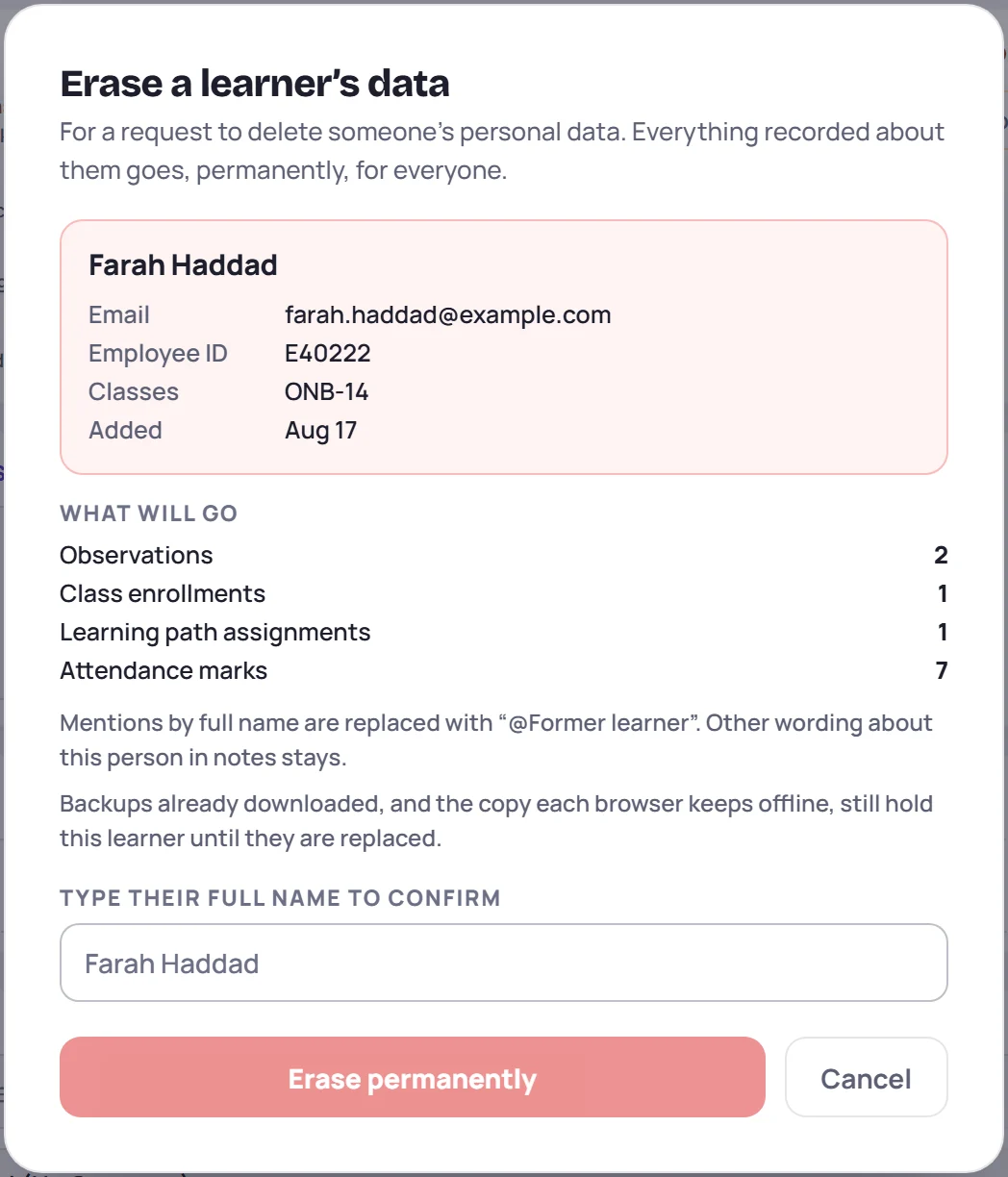
What happens:
- Their profile goes, with their class enrollments, attendance marks, certification scores and attempts, certificates, catch-ups, learning paths, files and named survey answers.
- Observations only about them are deleted, with their replies and files. An observation about several learners stays, without them.
- Tasks and questions about them are kept, but no longer linked to anyone.
- Mentions of their full name in notes become @Former learner. Any other wording about them in notes stays, so check notes that describe them in other ways. If another learner has the same name, the dialog warns you that their mentions change too.
- The audit log records that a learner was erased and how many records went, but not their name.
If someone adds a note about the learner while the dialog is open, Skovrum stops and shows the dialog again with the new counts. Erasing needs a connection; it's never queued to run later. When it's done, you're taken back to Learners.
Common questions
Someone left. Should I erase them? No, archive them. Erase is only for a request to delete their personal data.
I archived the wrong person. How do I undo it? Enroll them in their class again. Their history is all still there.
Why is there no Delete option? Something has been recorded about the learner. Archive them, or, if they've asked for their data to be deleted, erase them.